There have been a lot of InfoSec groups/forums where questions around AWS Security Hub are asked. I have observed that the people asking these questions are not really aware of what all they can do with the help of AWS Security Hub and why it is important. Many organisations face the challenges in securing their AWS environments, while for the others Security Hub is just about achieving 100% score and not really looking through the findings and implementing best practices in an "InfoSec approved" way. AWS Security Hub has been a game-changer, simplifying complex security tasks and empowering us to proactively address potential threats. In this article, we will look at insights to help you leverage Security Hub to its full potential.
What is AWS Security Hub
To start, what are we even talking about?
AWS Security Hub is a comprehensive cloud security posture management (CSPM) tool that helps you detect, look into, and address security threats throughout your AWS environment. It allows you to obtain a thorough grasp of your security posture by combining security results from several AWS services and third-party technologies into a single, cohesive view. The security controls implemented detect when AWS accounts and deployed resources do not align with security best practices defined by the security standards.
Now the question comes what is the baseline to assess these security gaps. It's a pretty straightforward approach implemented by AWS. The compliance standards offered by AWS against which compliance posture can be checked are below :
You might end up thinking that Security Hub is really cool and would help you in improving your security posture, however remember that there is a cost associated with everything on AWS and so is the case with Security Hub. More information on cost here.
- AWS Foundational Security Best Practices v1.0.0 (FSBP)—This standard is defined by AWS security experts; that means, AWS is responsible for updating and maintaining the standard. The controls of FSBP can be found here.
- AWS Resource Tagging Standard v1.0.0—Most of the AWS resources have a tag assigned against them (metadata). These tags help you to manage, organise, identify and filter resources. The 85 new controls in this standard can be used to determine whether any of your AWS resources lack the tag keys that your organisation needs. This is not really a security standard, it can help you with compliance best practices.
- CIS AWS Foundations Benchmark v1.2.0—CIS stands for Center for Internet Security. It is a non-profit organisation dedicated to improving cybersecurity practices worldwide and it provides CIS Controls. You can check your cloud security posture against CIS AWS foundations benchmark v 1.2.0 with the help of AWS security hub. The controls can be found here.
- CIS AWS Foundations Benchmark v1.4.0 and v3.0.0—CIS AWS Foundations Benchmark v1.4.0 & v3.0.0 include updated and additional security controls to address evolving threats and best practices and has stricter requirements and more detailed guidance for implementing security controls. The controls can be found here.
- NIST Special Publication 800–53 Revision 5—NIST Special Publication 800–53 Revision 5 provides a catalogue of security and privacy controls for information systems and organisations. The NIST standard can be found here.
- PCI DSS v 3.2.1—PCI DSS (Payment Card Industry Data Security Standard) is an Information Security standard applicable for the entities that store, process & transmit cardholder data. AWS Security Hub checks against a subset of controls in PCI DSS. PCI DSS standard can be found here.
To start with, you need to make sure that AWS Security Hub is enabled in your cloud environment. It can be enabled by integrating with AWS Organisations (An account is designated as the organisation's delegated Security Hub administrator account by the AWS Organisations management account before Security Hub can be used with AWS Organisations. The assigned administrator account in the current region has Security Hub enabled by default). AWS Security Hub can also be enabled manually via the console or invoking the security hub API. More information can be found at : https://docs.aws.amazon.com/securityhub/latest/userguide/securityhub-settingup.html
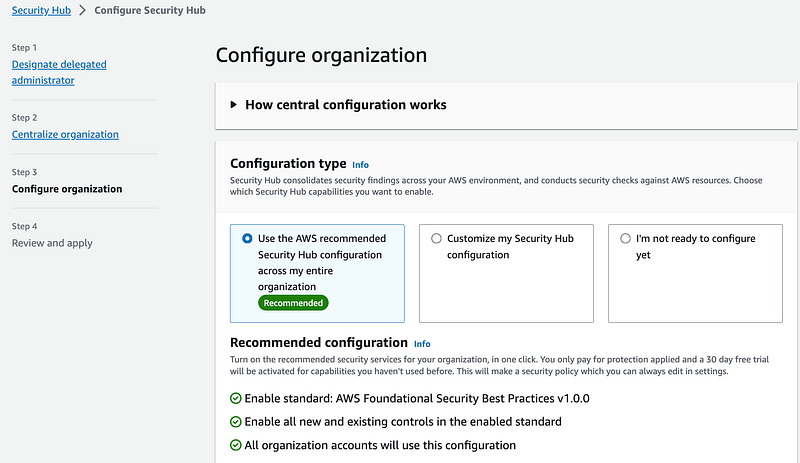
You can either choose to customise your Security Hub configuration or use the default one recommended by AWS as seen in the below image.
You can also implement multiple standards. Once a standard is implemented, you can see the "results" and the other standards are inactive and if you wish to use them, you can click on "configure".
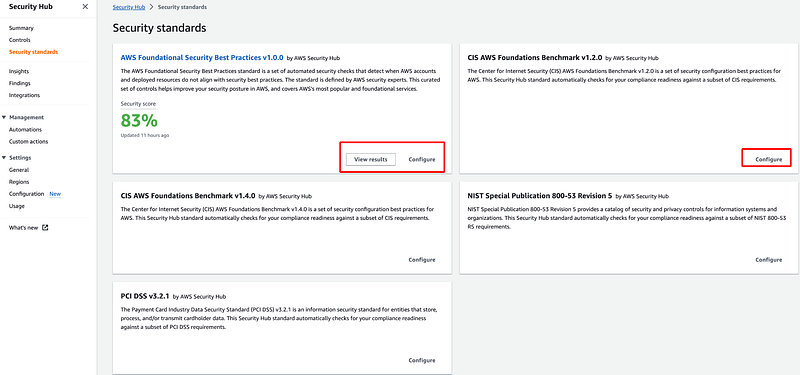
Once it is enabled, let us understand how to read the results.
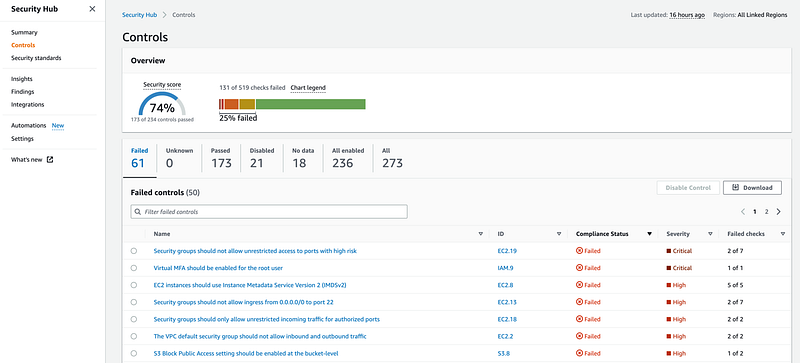
Once you click on the desired standard, you can see a list of "passed" & "failed" controls along with the overall security score. As seen in the above image, there are multiple failed controls with a security score of 74%.
Now, depending on your organization's Risk Management strategies, these findigs should be logically closed. Typically, CRITICAL and HIGH findings are taken first followed by LOW and MEDIUM. A few points to be considered here are :
- The severity of the failed control
- Number of failed checks
- The service that is affected by the failed control (IAM, EC2, S3 etc).
- The Account and Region of the failed control.
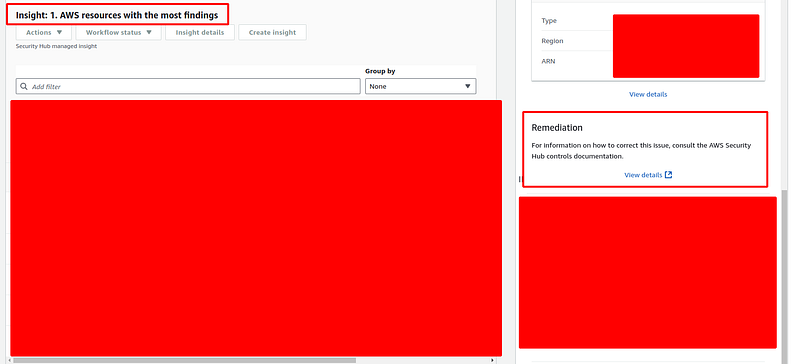
Next, you can work with the team managing your AWS environment to fix these findings. AWS documentations also provide possible fixes or remediations.
Understand the findings in a better way by leveraging insights
You might want to identify, assess and close the findings related to one account first or you might be more concerned about findings involving possible data exfiltration or sensitive data. In such cases, Insights help you to focus on a specific area and identify the findings in an optimised manner that helps you to go deeper in your cloud risk assessment exercise.
Go to "Security Hub" → "Insights".
Here you will be able to see various insights regarding the findings such as AWS resources with most findings, AWS resources that are associated with malware, AMIs that are generating the most findings etc. You can also create customised insights and add filters like "group by".
Tweaking the Security Controls
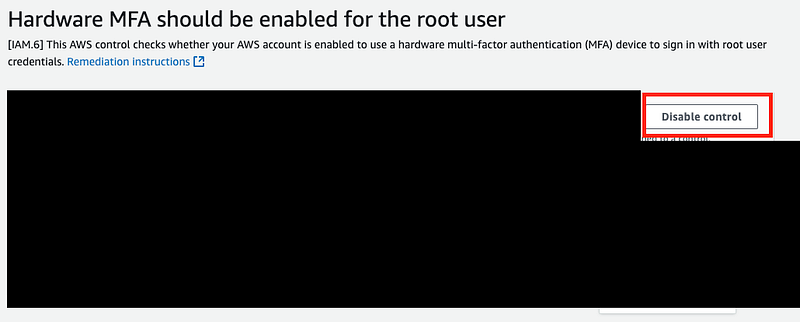
There are various instances where a particular control is implemented by an organisation in a different way, not necessarily as the standard suggests. It is also possible that practically implementing a control is not possible and there are compensatory controls around it. In such cases, a particular control can be disabled so that it stops generating findings.
E.g. for the failed control "S3 general purpose buckets should use cross-Region replication", it is quite possible that you may not be using S3 buckets at all, or even if you are, it does not serve a critical function of your business. In such case, you can disable this control after due approvals from the CISO or Security / Risk heads.
You can go to Security Hub → Controls → Click on the specific control and disable it as seen below.
Automation with Security Hub
You can also create various automation rules to avoid manual checks ata every stage. There are various fields such as AwsAccoundId, ResourceId, ResourceRegion, UpdatedAt etc. where you can apply filters like contains, equals, not_contains, not_equals, prefix, prefix_not_equals to create automation rules.
Automation Rule example :
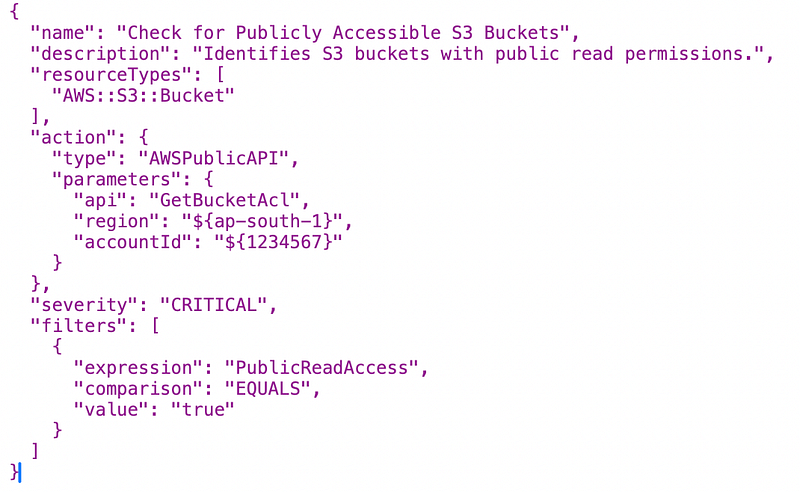
In this case, the rule will trigger if the S3 bucket has public read access. It will create a finding and tag it under "Critical" severity. Here, the AWS region and account are also mentioned.
Some more automation rule examples :
Remember, Security Hub is just a "Cloud Security Posture Management Tool" and not a comprehensive Risk Assessment.
- Check for Missing IAM Password Policy
- Ensure Proper Configuration of S3 Buckets
- Identify Instances with Insecure Security Groups
Security Hub just points out your compliance against the standard and best practices, known as controls.
Security Hub can :
- Identify potential vulnerabilities and risks.
- Provide recommendations.
- Prioritise the risks based on their severity and impact.
- Automate security checks and compliance assessments.
- Help you with your cloud security/risk assessments.
However, Security Hub cannot :
- Fix the identified issues.
- Prevent your cloud environment from security breaches.
- Ensure 100% protection against all threats.
- Guarantee your compliance with a standard. If you have 100% compliance for "PCI-DSS" under security hub, that does not mean that you are compliant to that. It is just about your cloud environment's compliance with that standard. Your applications, data storage & encryption practices and many other things together determine compliance to a standard.
You would always need controls around incident management, network security, access control, training and awareness etc. to strengthen your overall security posture.
Security Hub, in conjunction with these best practices, can significantly improve your AWS security posture and reduce the risk of security breaches.
For any queries, suggestions or comments, do not hesitate to write to me or leave a comment!
References :
- https://docs.aws.amazon.com/securityhub/latest/userguide/what-is-securityhub.html
- Links mentioned at different places throughout the article.
In Plain English 🚀
Thank you for being a part of the In Plain English community! Before you go:
- Be sure to clap and follow the writer ️👏️️
- Follow us: X | LinkedIn | YouTube | Discord | Newsletter | Podcast
- Create a free AI-powered blog on Differ.
- More content at PlainEnglish.io