Welcome to the series (Cloud Control Freak—the GRC way) of articles focused on GRC Engineering <> AWS. This series is for all GRC Engineering professionals who wish to learn about how GRC practices can be implemented in the cloud environment, how to go beyond the ChatGPT generated checklist based way of doing things, how to assess technical controls that stick to the boundaries of GRC and do not go beyond that and most importantly, what to focus on. I will try to cover why a particular control maters from the GRC engineering perspective, how to check it, what impact it has on compliance posture. I have divided the modules/services under AWS that I think are important, as per my experience in various audits, discussions and GRC engineering resources. I will cover one module in each article. Although this series focusses on AWS, the controls are more or less same for all cloud platforms.
In the cloud, identity is the new perimeter—and AWS IAM sits at the center of that perimeter. For GRC professionals, understanding IAM isn't just about checking boxes; it's about controlling access, preventing privilege creep, and ensuring traceability. In this module, we will see the key IAM configurations that affect compliance, risk exposure, and audit readiness.
First let's start with understanding what is IAM for someone who is new to this. AWS Identity and Access Management (IAM) is a web service that controls access to AWS resources. It allows you to manage users, groups, roles, and permissions, ensuring that only authorized individuals or applications can access specific resources. IAM helps secure your AWS environment by enabling fine-grained access control and centralized management of identities and permissions.
It is also important to understand some of the key concepts of IAM in brief. We will see each one in detail in the individual sections.
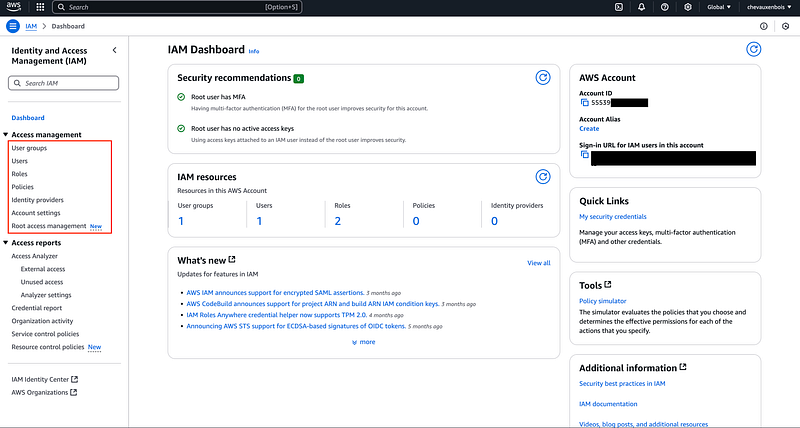
- Users : Individuals or applications that need access to AWS resources. E.g. Human user—John Doe from the SRE team. Application/Service user—s3UploadApp. Imagine you have a service for uploading your APKs to S3 buckets. You can use this user that would be consumed by that service.
- Groups : Collections of users, simplifying permission management for multiple users at once. E.g. InfoSec. You can add all users from the Information Security team to this group and grant permissions at the group level and not at individual level.
- Roles : IAM identities with specific permissions that can be assumed by trusted entities, such as services or users. You can use roles to delegate access to users, applications, or services that don't normally have access to your AWS resources.
- Policies : Documents that define permissions, specifying what a user, group, or role can and cannot do. E.g. AWSMacieFullAccess. This policy will give full access to the AWS service called Macie. This policy can be applied a group, user or role. If applied to group, gets inherited to every member. Example of a policy below :
- Permissions : The actions that a user, group, or role is allowed to perform on AWS resources.
- Security Credentials: Long-term and temporary credentials used by users and applications to access AWS services.
GRC Engineering Objectives
Objectives of someone from GRC engineering background should be very clear while assessing IAM module in AWS. These objectives should not cross the boundaries. E.g. a configuration related to cost is not a GRC headache so better focus on the actual objectives. The objectives in this section are not arbitrary—they map directly to GRC's fundamental concerns:
- Governance : Who can make decisions, who has what authority, and is it aligned with policy?
- Risk : What could go wrong if access is too broad, credentials are mishandled, or activity goes unmonitored?
- Compliance : Can we demonstrate to auditors and regulators that we're meeting our control obligations?
Some of the key objectives are :
- Ensure least privilege and separation of duties and accounts (individual accounts & service accounts)
- Limit attack surface by controlling identity sprawl
- Establish accountability through traceable & individual access
- Enforce multi-factor authentication, strong password policies
- Monitor and restrict all accesses
Key GRC Engineering Areas in Cloud Identity and Access Management
1. Users, Groups and Roles
- Are IAM users minimized? (Use roles + federation where possible)
Individual IAM users should be avoided unless absolutely necessary. Ideally, authentication should be handled through federated login (Single Sign-On) integrated with the organization's Active Directory or SAML provider. This simplifies access provisioning, de-provisioning, and periodic access reviews by centralizing identity management. In addition, IAM roles should be used instead of assigning permissions directly to users. Users or groups can then assume these roles as needed, reducing administrative overhead and enforcing consistent, role-based access controls.
- Are roles used for services instead of hardcoded access keys? Are group permissions aligned with job roles?
There are 2 ways services can access the workloads in the AWS environment. Wrong way of doing this is by providing hardcoded access keys that the service would consume (hardcoded in configuration files or code); while the right way is to map a role to that service while creating the service. Let's see with an example.
Example 1 : Using Hardcoded Access Keys (Bad Practice) An application running on an EC2 instance needs to access an S3 bucket. The developer configures it like this :
export
 AWS_ACCESS_KEY_ID=MYKExxxxxxxxxxxx
export
 AWS_SECRET_ACCESS_KEY=xyze1234abcd967ymlp94561zyok
Even worse if they include these credentials in a config file :
{

 "aws_access_key_id"
:
 "MYKExxxxxxxxxxxx"
,

 "aws_secret_access_key"
:
 "xyze1234abcd967ymlp94561zyok"

}
Risk : If the instance is compromised or the code is accidentally pushed to GitHub, the credentials can be used to access the AWS environment from anywhere, and likely won't expire unless manually rotated.
Example 2 : Using an IAM Role Assigned to the EC2 Instance (Best Practice) Instead, an IAM role should be assigned to the EC2 instance when launching it :
{

 "Version"
:
 "2012-10-17"
,

 "Statement"
:
 [

 {

 "Effect"
:
 "Allow"
,

 "Action"
:
 "s3:CreateBucket"
,

 "Resource"
:
 "arn:aws:s3:::my-sensitive-bucket/*"

 }

 ]

}
A cron job running on an EC2 instance with an attached IAM role can access S3 directly using the AWS CLI, with no credentials stored or hardcoded.
0 2 * * * /usr/bin/aws s3 cp
 s3://my-sensitive-bucket/data.csv /var/log/data.csv
Benefits : Temporary credentials are provided by the instance metadata service, rotated automatically by AWS, and are only usable by that EC2 instance. Any compromise is limited to that particular instance.
Where and How does GRC come into picture here?
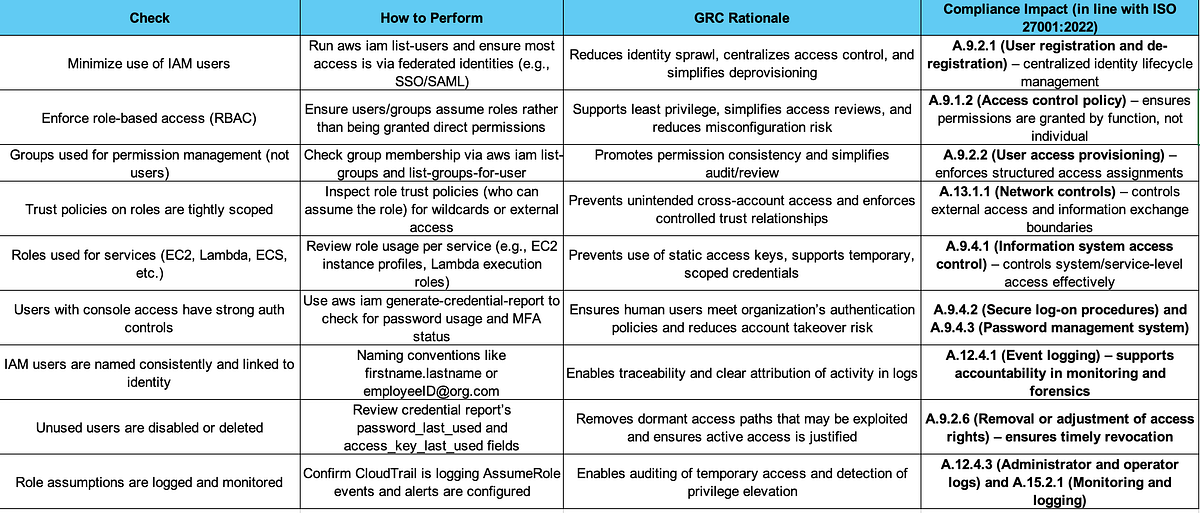
You could use the below commands on the CLI that can help with this review.
aws iam list-users
aws iam list-roles
2. Policies: Permissions Under the Microscope
Below is an example of an IAM policy:
{

 "Version"
:
 "2012-10-17"
,

 "Statement"
:
 [

 {

 "Sid"
:
 "CLICloudformationPolicy"
,

 "Effect"
:
 "Allow"
,

 "Action"
:
 [

 "cloudformation:CreateChangeSet"
,

 ]
,

 "Resource"
:
 [

 "arn:aws:cloudformation:*:*:stack/amplify-*"

 ]

 }
,

 {

 "Sid"
:
 "CLIManageviaCFNPolicy"
,

 "Effect"
:
 "Allow"
,

 "Action"
:
 [

 "iam:ListRoleTags"
,

 ]
,

 "Resource"
:
 "*"
,

 "Condition"
:
 {

 "ForAnyValue:StringEquals"
:
 {

 "aws:CalledVia"
:
 [

 "cloudformation.amazonaws.com"

 ]

 }

 }

 }
,

 {

 "Sid"
:
 "CLISDKCalls"
,

 "Effect"
:
 "Allow"
,

 "Action"
:
 [

 "appsync:GetIntrospectionSchema"
,

 ]
,

 "Resource"
:
 "*"

 }
,

 {

}
Let's break it in small pieces and see what each component means.
- Sid—identifier for the statement (optional)
- Effect : whether the statement allows or denies access (allow/deny)
- Principal : account/user/role to which this policy is applied to
- Action : list of API calls it allows or denies
- Resource : list of resources to which it is applied to
- *'' **means any action on anything
Where and How does GRC come into picture here?
Risks :
- Overly permissive policies (e.g., "Action": "" or "Resource": ""), even if unintentional, are violations of least privilege & could lead to unauthorized data access/privilege escalation.
- It violates various compliance standards, e.g. ISO 27001 A.9.1, A.9.4, NIST 800–53 AC-2, AC-6, CIS AWS Benchmark 1.4–1.12.
The GRC Engineering Angle :
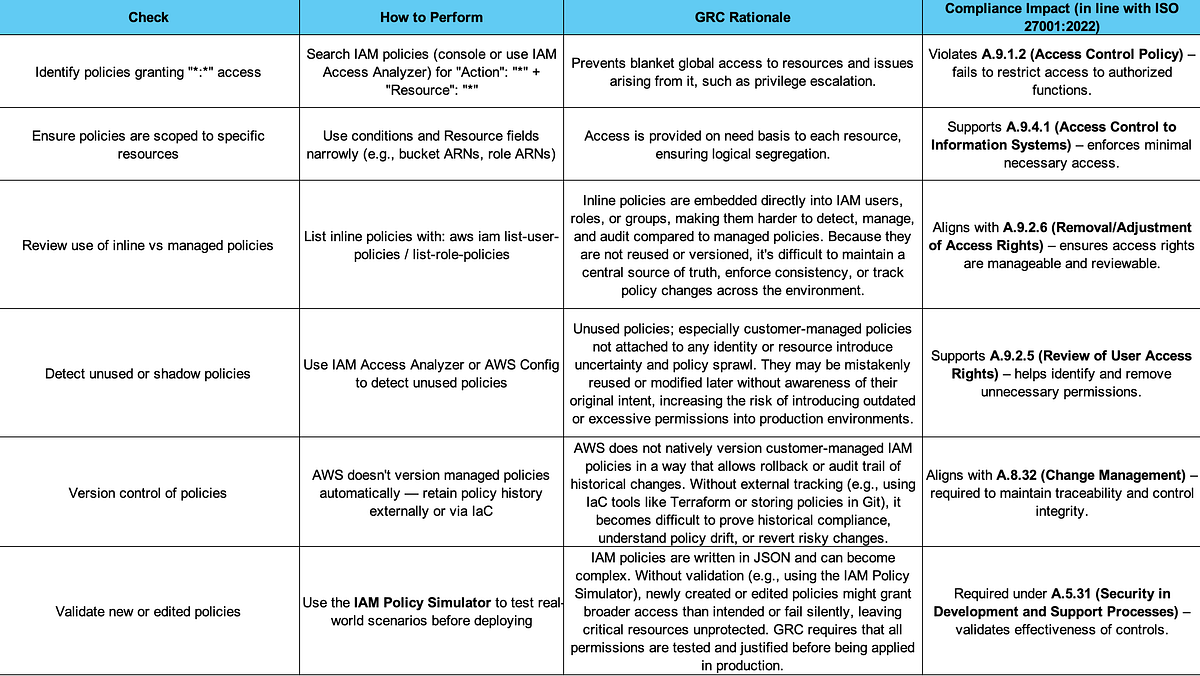
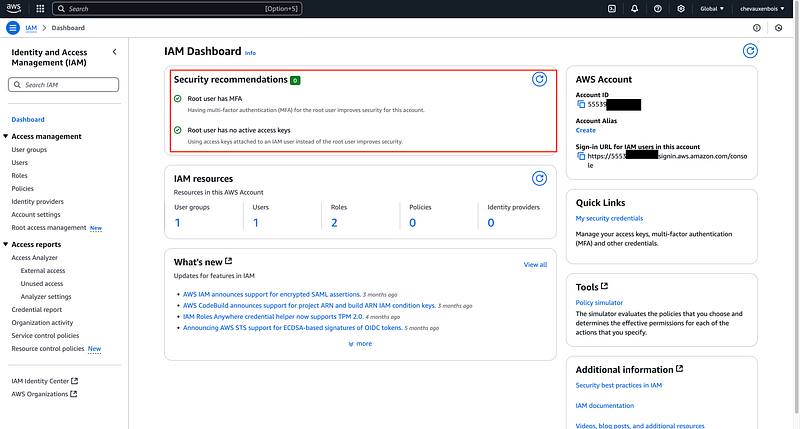
3. Root Account & MFA Controls
What to Check:
- Is the root account usage restricted and monitored?
- Is MFA enabled on all user accounts?
- Are login alerts for root activity in place?
- Are the root account credentials stored securely?
- Does only one person control the root account & has access to the root account?—this is important from a Business Continuity perspective.
GRC Risk : Root account misuse = critical impact.
How to check : Screenshot/Configuration review or JSON export of IAM MFA status.
4. Access Keys & Credential Rotation
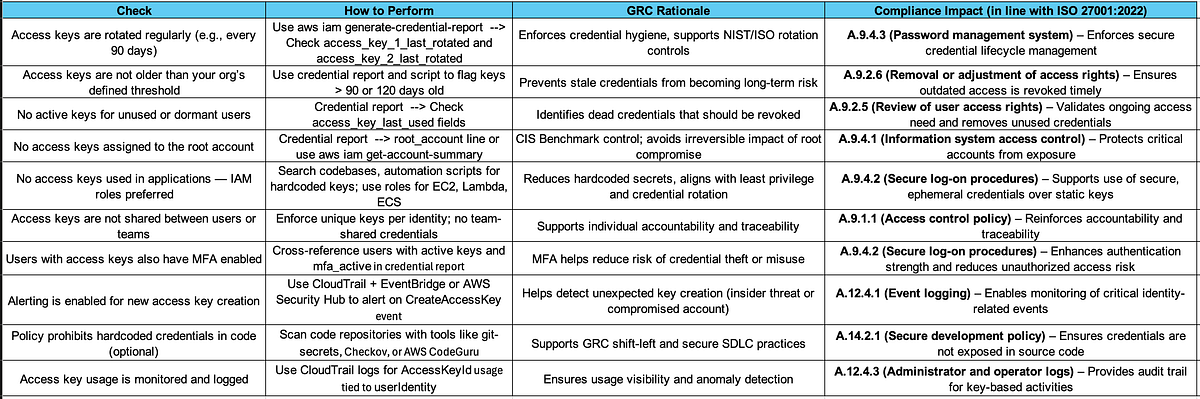
There are various elements assigned with access keys and credential rotation, for easy understanding, I have put it in a tabular format.
Let's see what to check under Access Keys & Credential Rotation, how to do this, what is the GRC rationale behind this and which ISO 27001 controls are impacted.
5. IAM Access Analyzer
IAM Access Analyzer helps identify resources (like IAM roles, S3 buckets, KMS keys, etc.) that are shared outside your AWS account—intentionally or unintentionally. For GRC, this is critical for detecting potential data leakage, policy drift, or unauthorized cross-account access.
Let's see what to check under Access Analyzer, how to do this, what is the GRC rationale behind this and which ISO 27001 controls are impacted.

6. Logging & Monitoring IAM Actions: Traceability for Audit
GRC is heavily reliant on visibility. IAM activity should be continuously monitored, logged, and reviewed to ensure that only authorized changes are made and that actions are attributable to a known identity.
If you need more information about CloudTrail, stay tuned, it will be covered in upcoming articles.

7. Password Policies: First Line of Defense for Human Users
IAM user accounts (if used) must follow strong password policies to meet compliance and security standards. AWS provides customizable password policy enforcement for all IAM users. Make sure to check that the password policy is in line with the Information Security Policy of the organization and as per best practices as described in ISO 27002/NIST.
GRC Engineer's checks for password policies :

To conclude, IAM is not just a technical control—it's the foundation of cloud governance. From enforcing least privilege to ensuring every action is attributable, IAM directly shapes your organization's ability to manage risk, prove compliance, and respond to threats. For GRC engineers, this module isn't just about configurations; it's about embedding policy into practice, and control into code.
In this article, we broke down IAM through a GRC lens—highlighting not just what to check, but why it matters and how to do it. As you scale in the cloud, well-governed IAM ensures that access stays aligned with business intent, audit-readiness becomes continuous, and your cloud footprint stays secure by design.
Next up in the Cloud Control Freak series: we'll tackle EC2 and EBS, where compute meets compliance.
Feel free to add comments, give suggestions for more topics! Do clap for the article if you think it has helped you and subscribe to my feed on Medium!